
Crap that did take a lot of cursing to add code snippets in Blogger. Anyway
Didn't hit the "any" coding key yet, just browsing through the project that LibGDX created, and now imported/opened by Android Studio. With my usual sceptism. I typically dislike these standard framework kinda things. And on top, I find Java messy by nature in terms of having 6-thousand different classes for even doing nothing (nothing = new Nothing() ), and having too many meaningless names. The Jelly core runs on Grapefruit 3 with Fat Bertha accelerated test-stubs, on top of Walrus balls. Any idea what I'm talking about? I don't.
Didn't hit the "any" coding key yet, just browsing through the project that LibGDX created, and now imported/opened by Android Studio. With my usual sceptism. I typically dislike these standard framework kinda things. And on top, I find Java messy by nature in terms of having 6-thousand different classes for even doing nothing (nothing = new Nothing() ), and having too many meaningless names. The Jelly core runs on Grapefruit 3 with Fat Bertha accelerated test-stubs, on top of Walrus balls. Any idea what I'm talking about? I don't.
The
project folder looks like a small battlefield, having lots of directories and
files that confuse me. But, where you should focus on for now, is the
"core". That's your playground, all the other stuff is multi-platform
mumbo jumbo, and of course the necessary LibGDX framework files itself. If you
open core/.../.../ JunkThrower.java, you actually see a few lines that look
like they may have something to do with your game.And you will quickly see the
3 stages as well here: "born",
"live", "die". Or as the function names would say Create,
Render, Dispose.
Got to admit... only 1 file and 3 functions to start with... And if you click "compile", it even works! Now that's why I call, a friendly introduction.


package com.mygdx.game;

import com.badlogic.gdx.ApplicationAdapter;
import com.badlogic.gdx.Gdx;
import com.badlogic.gdx.graphics.GL20;
import com.badlogic.gdx.graphics.Texture;
import com.badlogic.gdx.graphics.g2d.SpriteBatch;

public class MyGdxGame extends ApplicationAdapter {
    SpriteBatch batch;
    Texture img;

    @Override
    public void create () {
        batch = new SpriteBatch();
        img = new Texture("badlogic.jpg");
    }

    @Override
    public void render () {
        Gdx.gl.glClearColor(1, 0, 0, 1);
        Gdx.gl.glClear(GL20.GL_COLOR_BUFFER_BIT);
        batch.begin();
        batch.draw(img, 0, 0);
        batch.end();
    }

    @Override
    public void dispose () {
        batch.dispose();
        img.dispose();
    }
}
Now
assuming that you never really wrote a game before, lets quit a bit on the
stupid jokes for a moment, and let's try to actually explain something about game
mechanics. In a very global way, every game deals with the 3 stages above. When
Creating, you typically load resources. Like images, 3D models, sound effects,
level-data. Or, at least you load parts of them. Or “packages” that tell what
is available, and what CAN be loaded.
When you
start Doom, it doesn't load ALL levels (textures, music, props...) right away,
because that would never ever fit on your poor RAM or GPU. Big games will load
whatever is needed in a level, or streams dynamically on demand when approaching
new areas. The latter is usually the case in larger open-world games that don't
have a level-by-level design. For this tiny phone game though, it's probably perfectly
fine to just load (almost) everything at one. Except the levels structure
itself.
And all
that shall be created, shall be destroyed as well. Ashes to ashes, bytes to
bytes. The Dispose function will be called when shutting down. You should clear
resources, maybe save progress, kick him off the piano and stop the music. Now
Java will do a lot of the "garbage collection" for you, but still
there might be some doors you want to shut manually.
The real
star of the show however, is the "render" function here. Though I find
its name too specific. Rendering is about drawing the screen. Which happens
every cycle indeed, many times per second (in order to get fluid animations,
you really need 30 FPS at the very, very least). But there is more than just
drawing things. Games have a lot going on in there "update" loop
(which should have been a better name for this function, if you ask me):
·
Stream
resources (if you have a big game that can’t load all at once)
·
Processing
input (keyboard, mouse, touch)
·
Audio
(stop, play, loop,
adjust listener coordinates, modifiers, …)
·
Physics (simulate bodies flying, colliding,
floating, responding)
·
A.I. (scanning, decision making,
behaviour, path-finding)
·
And
of course graphics
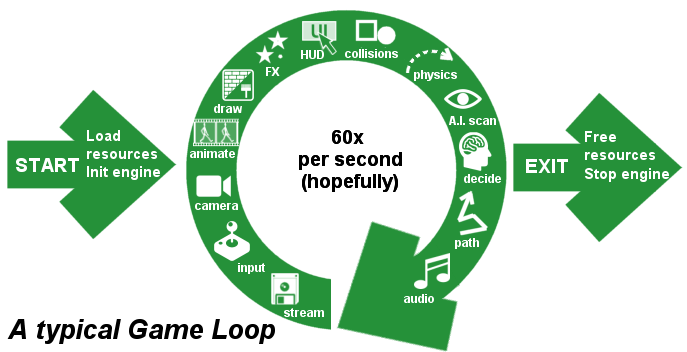
Anyway,
you can still add all those parts. The important thing to realize is that this
"render" function is being called lots of times per second, until you
close the program. I believe LibGDX tries to reach 60 frames per second by
default, but there is no guarantee you will actually make that. That shitty
virus-scanner in the background may stall your performance, but you too have to
be very careful with what you put in that “render” (or its sub-) functions.
Lengthy routines like loading data or searching in gigantic arrays, is usually
not a good idea.But
hey, why not check out what the auto-generated code got for us?
    public void render () {
        Gdx.gl.glClearColor(1, 0, 0, 1);
        Gdx.gl.glClear(GL20.GL_COLOR_BUFFER_BIT);
        batch.begin();
        batch.draw(img, 0, 0);
        batch.end();
    }
Seems…
it uses Embedded OpenGL for graphics. And it seems it first clears the
background, then draws an sprite in the topleft corner (0,0)... Sprite? The drink? The mythical fairy? No
idea why they ever called it that way, but yeah, sprites! Think about PONG, a square flying over your TV
screen. That's a sprite. Think about that purple glowing-thing that follows
Link all the time in Zelda “Occarina of Time”. That’s a sprite. And even a
fairy too!
Or
instead of a simple sphere or square, you could put a picture on it, eventually
a semi-transparent picture. For example, a plumber. And if you play multiple
pictures in a row, you get an animation. Like
Super Mario. These are sprites, and obviously your main ingredient for 2D
games. Though 3D games still use sprites too, mainly for particles and small
effects, like a flickering candle light.
Sprites
are basically just rectangular areas on your display - or (partially) outside
your view -, containing a (transparent) image. The size and position may change
each cycle, and so may the content image. In addition, sprites my scale, shrink
or rotate as well nowadays (in the Super Nintendo days, that was quite a
hardware achievement). You could have 1 sprite, or dozens. Of course, more sprites
means more drawing. Big numbers or very large sprites that overlap each other,
may eventually slow things down. So typically you only want to render what is
inside your view – which is fortunately fairly easy to do in 2D games.
So yeah,
that's basically what we're gonna do. Load a bunch of images, make sprites, and
move them around. Oh, and with a bit of sound, A.I., pathfinding, game-rules,
touch-input and special effects of course.


