Saturday, March 30, 2013

T22 Book Club

What is this?! Blogger suddenly changed the whole lay-out?! Jesus would turn over in his cave. And walk out.

Maybe this new look isn't so bad, but some parts are broke, and I hate coding HTML. I've been programming pretty much everything the past century, but I just never got into HTML, Javascripts, or any other webpage-building technique. Don't know why. Either I like something, or it doesn't interest me a single binary bit.

Well, the Compute Shader tutorial is finished, and let's not complain again about how difficult it is to motivate a team, make rapid progress, and show you eye candy every few weeks. No. Let's talk about something different... right? .... Hmmmm .... everything ok at work …. Nice weather ... Or actually not, my balls are still freezing off here in Holland ... yeah ….. cold ….. saw any TV yesterday? …. Pfff, really cold outside …. I’m allergic for woolen trousers ….


Nope, not much special to report from T22 either, so I just recycle this gun again.

Wait, I know something. Books!
I’m not much of a reader. Except that I read fairy tails and kids stories (“Jip en Janneke”) every day for our little girl. Which is completely awesome, so if you need a good excuse to read kids books, just make a kid somewhere. But other than that, we don’t have filled bookcases around here. Not that I don’t like reading, and sometimes I do get a nice book from friends, but I usually just don’t have time. Or don’t make time for it, whatever.

However, last Christmas Santa gave me two books (using my own wallet to pay them). First there was “Eugene Sledge: With the old Breed”, which is truly brilliant. You may remember the name from the HBO series “The Pacific”. Well, character “Sledge” really existed, he fought in the Pacific (WO2 really happened too!), and wrote a book about it. Not just a summation of 4 April 1942, Hitler shaved his moustache, 5 April 1942 Frozen beef for diner again, 6 April 1942 some Japanese made stinking Sushi in the foxhole next to us. No, the man actually had the talent for writing things down in a grim, graphical, but also neutral way. No waving American flags and hero’s, just the war as dirty as it is. A biography that shows humanity in its worst possible way. I can really recommend it, and I’ll sure get back on it here some day.


"The Why's and How's of Level Design"
But after five paragraphs I still didn’t reach the actual topic (bad habit), that other book, “The why's and how's of Level design”, by Heurences, or Sjoerd de Jong. That name sounds Dutch btw, or Belgium maybe. You don’t have to be a mastermind to figure what’s the book about. As said before, I never really red about “making games” either. Pretty much all the programming knowledge comes from internet webpages, example programs, and just by looking at the neighbors. Also, the design of a level is not exactly the terrain of a programmer. Design contains
• Picking themes
• Making realistic plans. What can be done, and what can’t be done with the time & tools
• Drawing floorplans
• Make the map suitable for the given type of gameplay (shoot, puzzle, race, platformer, …)
• Making wise use of eye catchers
• Texture & color palette
• Lighting
• Modeling it
• … And so on …

This book covers all these topics, but on a more general level. It doesn’t explain which buttons to click in Maya to create a donut. It focuses on techniques that generally work for level design, and of course, he also shows the counterparts: things that should be avoided. That may not sound very helpful, but it’s just true that many, many amateur and hobbyists make the same errors when designing a new level pack or game MOD. Really, level Design is a job on its own, and you can’t just teach it yourself by reading a book or two. Neither with this book (but neither does the author claim that).


Like developing any creative talent, becoming a good Level designer requires practice. Lots of it. But Rick, why would you want to become a Level Designer? Get back in your programmer hole! Maybe I should, but unfortunately, this project doesn’t have a level designer yet. Of course artists have nice ideas and knowledge about how to setup an interesting scene. But it’s too fragmented to create a consistent world that exactly fits the Tower22 needs. As the book explains, all different elements need to become one. A sports car may look great, but it doesn’t belong in the world of T22. Of course the artists know what the word harmony means, but then the level design still needs to meet the story and gameplay requirements. And my twisted mind about how a horror game should look like, which isn’t the same as Resident Evil or Silent Hill, to name a few.

That’s why projects have one or a few lead designers. They understand all these requirements, and coordinate the artists. Obviously, I play a part in that, as I created the ideas. And most others don’t have time to learn the game plot thoroughly, neither time to coordinate and monitor other artists. So, that makes me pretty much the Level Designer.

No Emmy award for this drawing, but at least I know how to use MS Paint a little bit to make my point clear.

Yet I lack skills when it comes to architecture, making outstanding artwork, advanced 3D geometry, or drawing textures. Not that I have to model everything myself, but it would be nice to get some better understanding, to improve the communication. One can only transfer his ideas to another if he knows how to explain, sketch, and divide the work in concrete tasks. Usually programmers (Beta’s) and artists (Alfa’s) approach things completely different, so as a programmer, I needed to dive in their world a bit to get on one line. That’s why I bought this book basically.

Back to the book. The author covers most of the design aspects you would expect. How to make geometry look interesting? How to break up boring repeating geometry (a very real problem for the T22 corridors), which lights can be used where, and the importance of respecting core gameplay features rather than just mixing random “cool” ideas. But it also tells about planning, and making realistic, feasible ideas. A mistake often made by beginners is trying to do “everything”, but soon finding out the plans are overambitious. Leading to nothing, or half-finished inconsistent results. The book uses a lot of colored pictures, comparing good & wrong situations to show you why certain techniques work, or don’t work. Hence the book title “whys and How’s”. The book finishes with some Unreal Tournament levels he did, and also nice, interviews with artists from the games industry.


My 50 cents
Cool and The Gang. But, the key question, did we learn from it? Hmmm. First, as said before and by the author as well, you don’t just learn level design. You have to try it yourself. Then this book can be used as a guideline to reach good results earlier, and to avoid pitfalls. And although I disagree on a few statements, the book makes logical sense. The advises are true, and he manages to explain it without floating away in vagueness, though a beginning artist may miss some deeper explanations here and there. Many examples are a little bit too Captain Obvious.

Then again, maybe I’m not a beginner when it comes to Level Design. Ever since Super Nintendo and Doom2, I’ve been drawing floorplans, fantasizing about game worlds, and carefully looking at other games. When I play Crysis, I don’t just get “wowed”. I try to find graphical weaknesses that reveal how the world was made. Which techniques, shaders and elements were used? When playing Halflife2, I look beyond the battle and notice the backgrounds and styles that are used to make a believable, immersive world. When thinking about puzzles, I remember how smart and complex the Zelda worlds were made. I know the contrast between nineties games that focused on simple but addictive gameplay, and the more realistic 21th century “next gen” engines (that don’t always succeed in delivering a fun game). So, that doesn’t make the advice from this book less valuable, it’s just that I wasn’t surprised by most advises.

Ok, a little bit news then; bullet holes.


Second, the showcases are obviously aimed at the Action & Shooter genre, using UDK and Unreal Tournament (Deathmatch) levels in particular. That’s fine of course, since shooters are still a popular genre and tend to search graphical limits more than any other genre. But gameplay wise, I couldn’t map it on Tower22, which has a very different, almost unique, style. For example, although I agree with the author that clichés and exaggeration works in games to compensate the lacking (hardware)capabilities to pull you in the game, I try to break with some of them. T22 should not look as if it has been done before.

Another difference. Unreal-like games are split in levels. It’s all about rapid, addictive gameplay. World one doesn’t have to do anything with world 2, just as long they are well designed when it comes to shooting another. World A can be a science fiction space station while world B has a “Capture the ketchup in McDonalds” theme. But most single player, story driven games, can’t permit this variation. Especially not a game like Tower22, where the horror atmosphere is the dominant factor (maybe even more than gameplay). A single mistake can ruin the immersion. Rooms that should be scary but feel safe, cheesy music, a laughable monster, overused predictable clichés, a wrong pacing and timing of scary events… all will reduce the horror experience to a joke. A shooter game can fall back on its core action elements if the environment makes a mistake, but T22 can’t. Of course the book explains how to make floorplans and climaxes, but not in detail. Making a complicated but satisfying puzzle, or a truly scary environment needs some more explanation.


The verdict
Well, those were my two complaints. It’s not really a mistake of the author, as he just choose to use the action genre as a demonstration. You can’t write a book about everything, for both a beginning & experienced audience. So if you want to make action game levels / MODs but don’t have a whole lot of experience yet, I’m sure the book will give you valuable advice. As for me, I need to find an Level Designer that has experience with both horror and complex interconnected puzzle worlds (such as Zelda or Metroid). But where to find those? Abduct George Trevor maybe? (fictive architect of the Resident Evil mansion)

Saturday, March 16, 2013

Charlie & The Compute-Shader factory #3: Tiled Deferred Lighting

Finally. Another post. Sorry, I’ve been busy, mainly at work. And with playing the Sims with our daughter… Maybe I shouldn’t have said that.

The previous Compute Shader post ended with brabble about semaphores, mutexes and other ways to synchronize and avoid conflicts between threads. Ok, but why would one worker has to bother another worker? You would be pissed too if the neighbor shows his head above the fence everyday to interfere with whatever business you’re doing. Respect a man’s privacy! Yet, in Compute Town, there are scenario’s that require cooperation between the elements being executed within a Warp/Wavefront. The last compute shader manuscript, for now. A practical example, on Tiled Deferred Lighting, made by the Pope, in Taiwan, brought to you by MacDonalds.

Deferred Lighting, anno 1725
---------------------------------------------
This post is aimed for the more advanced users. So, if you never wrote a Deferred Renderer or the likes, try that first. But anyway, here a short mind refresher on the traditional Deferred Lighting pipeline:
1- Fill (full screen) G-Buffers
With pixel attributes that represent the scenery your camera sees. Attributes such as the 3D position, diffuse/specular color and normal for each pixel.

2- Draw diffuse/specular lighting into another texture buffer(s)
- For each lamp, render a rectangle, cone, sphere or other shape that covers the area that is *potentially* affected by that lamp.
- For all pixels being overlapped by that shape, calculate if the lamp really affects the pixel, and ifso, compute the color results. To do so, use the G-Buffers from step 1.
- Use additive blending to sum up the result of each light, in case a pixel gets affected by multiple lights.

3- Render the scene again, multiply it with the lighting buffers from step 2.

Systems up? Good. Although this approach is easier and faster than traditional forward rendering, there are still two major issues that slow down the process:
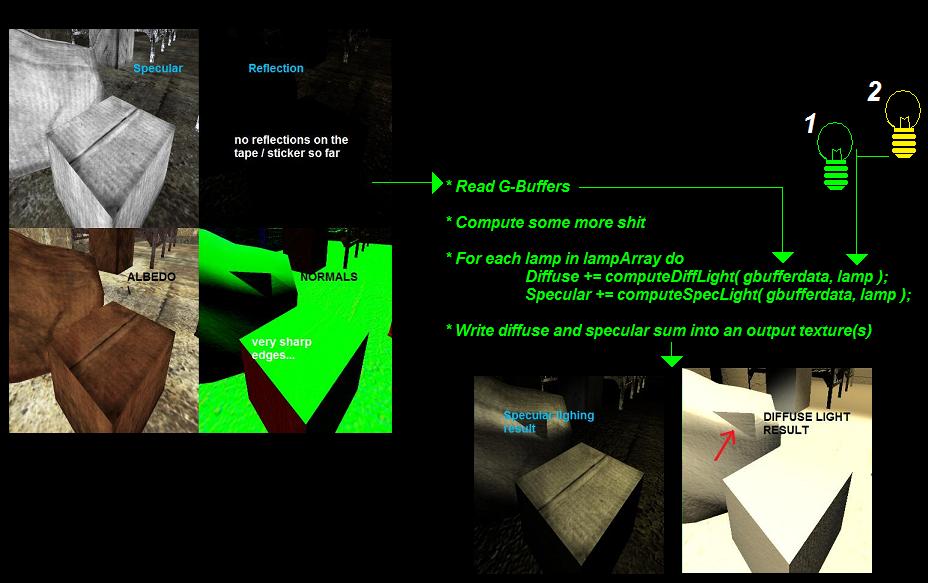
- If a pixel is overlapped by 10 lamps, some steps such as reading the G-Buffers and doing some vector calculations, have to be redone 10 times.
- Additive blending, although not slow, is not super fast either.

These two issues are the price you pay for handling each light in a separate pass. It would be nice if we could combine all the lamps into a single pass, so we only have to do the computations once, and do the additive blending internally. Like this:

Thanks to uniform buffers and such, making an array of lights isn’t too hard. But… there is one stinky catch. How do you know which lamps from the array apply on a particular pixel? If you have 100 active lights scattered on your screen, it doesn’t mean each pixel should loop through all 100 lamps. Well you can do … but it’s stupid.


Deferred Lighting, anno now --> Tiled Deferred Lighting
---------------------------------------------
Did you see the Batman signal projected at the clouds? That means a Compute Shader is needed. We can do all the testing and lighting in a single program. The idea is pretty much the same as illustrated in the Rick++ code above, except that we also test which lights should be involved, and which can be skipped for a small region of pixels. After all, a local light in the top left corner of the screen shouldn’t lay his dirty hands on pixels in the opposite screen corner. Since this testing step is quite expensive, we don’t cull the lights for each pixel, but per “tile” (hence the name).

Tower22 is progressing very well

Technically speaking, all pixels within a Warp/Workgroup can form a square tile together (32x32 pixels for example). Instead of testing for each individual pixel which lights affect it, we do it per tile. And since we have 32x32 (or more) pixels within a tile, we can nicely divide the work. For example, if each pixel just tests a single light, we can perform 1024(32x32) checks simultaneously. Oh yeah, parallel working remember? All pixels within the tile are executed simultaneously, so instead of 1 pixel doing all the work, kick their lazy asses of the couch and divide the work.

That sounds logical, but if you are like me, you are probably already trying to figure out how you would code that in Cg, HLSL, GLSL or whatever language… coming to the conclusion you don’t have a clue how to let pixels cooperate. Well, that’s one of the major differences with common shaders and Compute Shaders such as CUDA or OpenCL. Let me explain the “Tiled Deferred Lighting” (OpenCL) compute shader step by step. First, an overview of all steps performed within this (single!) shader:
1- Setup tasks to run
2- Attach in- and output buffers to CS (parameter setup)
3- In the CS, let each task read the pixel position (and maybe normal) from the G-Buffers
4- Make a bounding box for each tile
5- Test by which lamps a tile is affected (thus test per tile, not per pixel!)
6- Apply the lamps from #5 on the tile pixels. Sum up the results
7- Write the results to the two output light textures


******* 1. Setup
Before we can drive, we first need to start the car of course. Same for launching Compute Shaders. This is a bit different than you may be used to with OpenGL for example, where you activate a shader (change the state-machine) so all upcoming drawing calls make use of it. Remember, Compute shaders have nothing to do with GL/DX, so neither do they have to be executed within a GL/DX context.

Well, as for Deferred Rendering, we typically render the results in one or two full-screen textures. Let’s say your screen resolution was a whopping 1024 x 768. That means we have 786.432 pixels to calculate. In other words, the Compute Shader has to run 786.432 tasks, where each task calculated the lighting and writes the output into those two textures.

We give these tasks to the GPU, and to make real advantage of the hardware, we make Warps/Wavefronts (or called “Workgroups” in OpenCL) of 16x16, or 32x32 tasks (or whatever you prefer). Remember, tasks within a Warp can run simultaneously. Each group would draw one tile on the screen. Btw, one note, keep in mind that in OpenCL, the total number of tasks must be dividable through the workgroup size. 1024 / 32 = 32 = ok. 768 / 32 = 24 = ok. If the outcome wasn’t a rounded number, you may need to adjust either the workgroup size, or the total amount of tasks.


******* 2. Attach in- and output buffers
I said Compute Shaders have nothing to do with your graphics API (let’s assume OpenGL), but that is not entirely true of course. Our CS needs to read G-Buffers that were produced earlier via common ways, and also the output must be inside a texture that GL understands. Luckily, this is possible via Interop Buffers. You can share GL vertex, uniform and texture buffers with a CS so you can directly read or write in them. Phew.

Besides textures, we also need some sort of buffer that tells about all the (active) lights in the scene, so the CS can loop through them. I would make arrays of structs for pointlights, spotlights, and so on. Those structs then contain the light colors, matrices, shadowMap coordinates, et cetera. I store all shadowMaps within one bigger texture btw. To illustrate what you may need, here the kernel declaration in the CS shader:
__kernel void tiledDeferredLighting( const float camX,  const float camY,  const float camZ,
  __global struct shUBO_Lights* lights,
  __read_only image2d_t gBuf_Specular,
  __read_only image2d_t gBuf_Normal,
  __read_only image2d_t gBuf_WorldPos,
  
  __read_only image2d_t iTexShadowMapsSpot, // all spot shadowMaps
  __write_only image2d_t oTexDiffuse, // Diffuse output
  __write_only image2d_t oTexSpecular // Specular output
  )
{
   …Magic Johnson…
}


******* 3. Read G-Buffers
Diving into the G-Spot, eh, CS code now. OpenCL can read 1D, 2D and 3D textures, using linear or integer coordinates, and eventually with mipmapping. The code is less handy compared to your common shaders, but it works. One slight difference is that you have to make texture-coordinates yourself now. This can be done by looking at the local- or global IDs that are given for each task. If you run tasks as a 2D array spread over the screen, the ID’s will correspond with (integer) pixel coordinates:
  int2 globalID = (int2)( get_global_id(0), get_global_id(1) );
  int2 localID = (int2)( get_local_id(0), get_local_id(1) );
  int2 texcoord = globalID;
  
  // Get G-Buffer data
  const sampler_t samplerG = CLK_NORMALIZED_COORDS_FALSE| // <- use integer coords instead of 0..1
              CLK_ADDRESS_REPEAT         | // 
                     CLK_FILTER_NEAREST;    // <- filtering method

  float4 gWorldPos = read_imagef( gBuf_WorldPos , samplerG, texcoord );
  ...

The global ID is the absolute number of a task. A local ID is the same, but within a Warp/Wavefront/Tile/Workgroup or whatever the hell you like to call them.


******* 4. Make a bounding box for each tile
In the setup from above, we made 32x32 tiles. Instead of letting each pixel test by which lights it would be affected, we do it per tile. Do the math, either test 1024 x 768 = 786.432 times, or {1024 x 768} / {32/32} = 768

E.Honda wins. If we know a bounding box, we can do a simple test to see if a light intersects the contents of a tile (and thus affects 1 or more of the pixels within). As an extra test, I also compute the average normal for each tile. If the pixel normals vary a lot within the tile, it has no use. But often you'll be looking at a relative flat piece where all pixels face the same direction more or less. So if the average normal is useful, we can also exclude lights that shine from the wrong direction.

Now, how to find the furthest or closest pixel within a tile? Let each pixel read a whole rectangle from a Z buffer? No, no, no. Damn no. This is where cooperation between tasks becomes useful. Let each task just read a single pixel, as usual. But use shared variables and a “min” & “max” function. Each task would overwrite the highest value in case it found a further pixel. However… Remember all the thread drama from previous post? Since the tasks run simultaneously, you can’t just do “furthestPixel = max( furthestPixel, myValue );”. Use an “atomic” operation instead. This ensures only 1 task will update the variable at a time:
  __local float minZ; // “__local” tells the variable is shared with all tasks within the tile
  __local float maxZ;

  ... read depth buffer

  minZ = atomic_min( minz, pixel.z );
  maxZ = atomic_max( minz, pixel.z );

  // Notice that these atomic operations may slow down the progress as a whole, as other tasks
  // within the tile need to wait (shortly). Minimize the atomic operations, or if it's really causing
  // problems, consider doing the testing on a lower resolution buffer (= less tasks).

The same tricks can be applied to find out whether the all the normals within a tile are more or less the same. Ifso, you can skip lights that shine from the wrong direction. You could for example sum up all normals, and then calculate the average normal and see if it’s not too different from the min/max normals.

Before averaging, you may want to ensure all tasks are done summing up. And also, if you don’t want this whole normal-check, you still have to wait till all tasks are done before you can proceed with the next step. To do so, use a barrier:
........barrier( CLK_LOCAL_MEM_FENCE );


******* 5. Test which lamps affect a tile
In the previous step we found some values to make a bounding box, and eventually an average normal. Now let's see which lights intersect, and can potentially lit them (notice we don't test shadows yet). Although the test is relative cheap, again we have to cooperate instead of letting 1 task looping through all lights and the other pixels jerking themselves off. For example, give each pixel 1 light to test, using its local index (see #3). So if there are 50 lamps, pixel0..49 will test... and the remaining ones will jerk off.

In practice, it's a bit more complicated as we have several types of lights. Mainly spotlights, pointlights, and huge sources such as the sun. So, use your creativity. The point is, spread the work! If a light passes the test, it has to be added to a list. If you know threading, you also know that dealing with lists can be tricky. Consider this:

In higher programming languages, we can usually lock a list, add or delete an element, then unlock it again. But we're working in the abyss here. Luckily, its fairly easy to achieve the same. Just use
__local int arrayIndexCounter = 0;
__local struct lights[MAX];
...
if ( lightPassed )
{
    int n = atomic_add( arrayIndexCounter ); 
    lights[n] = myTestedLamp;
}

The atomic operation ensures n will be filled with a proper value. Btw, there are also faster hardware counters for this purpose I believe, but I haven't tried them yet.


******* 6 & 7 Lighting
Showtime. You found all the lights and placed them in array(s). Now let each pixel loop through all these lights and apply them on itself. Where traditional Deferred Lighting would need additive blends, we can just sum lights with the good old + operator.

This step does pretty much the same as a normal lighting pixel shader, except that it does all the lights at once in a loop. The bad news is that you may have to (re)write quite some code in OpenCL for all the different types of lights. So, do it smart and write it as functions you could reuse in some possible future CL program.

The results simply get written back into a texture, in a similar fashion as we readed pixels in step #3.


----------------------------------------------------------
Step 4 and 5, where multiple pixels share and contribute to the same data, is something that wouldn't be possible with ordinary shaders. And although you may not be in the need for such tricks soon, there are certainly scenario's that can benefit from this, or wouldn't even be possible without Compute Shaders (making octrees on the GPU for example). For that reason, it's good to step inside the world of Compute Shaders when you have a chance. Setting up a CS and launching it is childsplay, as the OpenCL API is very small compared to OpenGL. Finding good reasons to use a CS on the other hand is another story. It requires creativity, and a good understanding of when & what can benefit from CS features that aren't possible with common shaders. To be honest, I haven't implemented any CS into Tower22 yet. Either I could do without, or my older laptop card didn't support some of the (atomic) operations that make a technique like Tiled Deferred Lighting interesting.

Well, just download a demo and see for yourself. As usual, the best practice comes from trying yourself and looking at the big boys. Once you sucessfully filled some buffers, you will also learn that a CS can be used beyond 3D graphics and games. Maybe it will become useful one day!

I couldn't make a post without showing at least 1 interesting image. Or at least... I'm a bit proud of it as this is the first time I kinda sucessfully used the Wacom tablet, not drawing like a toddler. Other than that, it's nothing more than a conceptual monster that probably won't make it to the final rounds ;)

Saturday, February 23, 2013

Crap! Leaked versions!

The slow progress on this game is frustrating. We all know that making a game ain't easy. Imagine you had to shoot a movie like Jurassic Park all alone. Writing the script, doing the camera work, composing the sound, putting on a Brontosaur costume and do the Dino moans. Fortunately, I do get some help from talented people, though with their small numbers and busy time schedules, it's still like Steven Spielberg getting help from the neighbor kids once in a while.

Well, that's just something you have to accept when you plan a hobby game. Especially if it will be a bigger game with relative high standards on the graphics, audio, design, and... pretty much everything. Yet, its sometimes frustrating when you think you have a “Golden Egg”, but just not the resources to hatch it. Like trying to grab a 100$ bill laying down a well, but your arm being 3 cm too short. Like… well, you get the point.

Even more frustrating is the fact that a lot of *TRASH* on the TV and game console do get a (big!) budget to produce their FOUL. I see "comedy" movies with jokes that could have been written by our retarded parrot on a daily basis. Action movies with scripts that aren't bad because the director intended to be cheesy, but because the director IS BAD. And c'mon, why do idiots like Snooki and The Situation turn into millionaires? It's a disgrace. If all that wasted money would have been spend on something more creative, ambitious, new, fresh, initiatives...


The first green object in the grim dirty world of T22.

But that's how the world rolls apparently, another fact to accept. In the meanwhile, we slowly advance towards to the next demo movie release, yard by yard, in a muddy trench war. But hey, Cheer up! I actually intended to show you some fun & positive clips in this post.

If you ever made a game, or mod, or custom level, or anything creative, you are likely familiar with the Critical-Why?-Breakpoint. No? Yes you are. You start with a lot of energy on your new game, book, comic or Unreal Tournament level. After a few days (or months in case of a game), and after seeing some first results, you probably ask yourself why you are spending so much hours on it. Usually the new levels look ugly, and the game doesn't feel like a game at all. More like a machine playing some cheap effects when pressing a button. Making a creative product is about ups and downs. Sometimes you amaze yourself with good looking pictures, another time you’re about to throw the towel because it all seems pointless. This is actually why 99% of the creative (hobby) projects fail.

The last weeks I've been implementing the gun further. Not that Tower22 will become a shooter, but... gun + monster = game. It's really to give ourselves something "playable", which will encourage to implement more gameplay related stuff such as enemies to fight, an UI, climbing a ladder, or solving a puzzle. Anyway, while looking on the internet how other games fire their guns (it's more than just a spitting a projectile and let the speakers say "boom!"), I stumbled across some funny clips. How about this Doom - Alpha versions:
Doom early Alpha versions

You may remember Doom as an awesome, highly addictive, well working, and also graphically great game. But as this movie shows, the game wasn't born perfect. Even later alpha versions still sucked graphically and game wise. Shooting an ugly boomstick with bad sounds, letting non responsive monster sprites just disappear. It reminds me very much how the half finished, broken gameplay feels on the games I did/do. And that cheered me up :) You would think game Gods like id Software would create cool stuff right from the start, but their alpha versions just suck as much as mine does hehe.

Speaking of early alpha's. Asides from the realtime GI, and a new texture on the lower wood panels, this still isn't the type of picture to proudly show. But I'll promise you, this corridor will become a whole lot more special within a couple of months... Then compare again.


Doom was a long time ago, but when watching the movie, I suddenly remembered the fuzz about Doom3 & Halflife2. While the entire game-world was anxiously waiting, id and Valve were developing their (over?)hyped sequels at a -what seems for us- slow pace. But then, Oops Poops, their alpha versions "leaked", one or two years before the actual releases. Maybe they leaked it on purpose, just to see what the audience would think. Well, let me tell you what I thought: IT SUCKED!

Although the leaked Doom3 alpha was already graphically appealing, the loose pieces of gameplay felt very stiff and scripted (duh, it was intended for a E3 demonstration) and... just not like an enjoyable game. The Halflife2 leak had more challenging enemies & allowed you to play with physics (new for that time!). Yet the level design was a mess and the graphics were dull compared to Doom3. Again, a half scripted mess, and the fun in shooting Combine soldiers and zombies didn't last long.
* Doom3 leaked version
* Halflife2 leaked version

Of course, I realized those versions weren't finished, neither intended for my dirty fingers on the keyboard yet. But I remember having serious doubts, especially about Halflife2. Would that game ever become fun? It was a classical showcase that good graphics and carrying a well known title, aren’t going to save weak gameplay.

Implemented a simple backlighting method for the plant. Should evolve further when making more advanced SSS/translucent materials in the future.

Well, fortunately both Doom3 and Halflife2 also showed that you shouldn't judge a "WIP" (Work in Progress) product. Because the final versions polished the bugs, improved the visuals (especially HL2), replaced bad audio, and maybe most important, gave an immersive world that invited for exploration, and made shooting zombies fun again. Really, small tweaks can do miracles and the "completeness" is a very important quality factor. Hence, after finishing the official HL2, I realized that the leaked version already contained most of the levels globally, but in such a poor state that I couldn’t make a consistent, story driven game of it.
* Halflife2: Alpha graphics versus Finished graphics

Remember those things once you're getting a "programmers-block" again, while having Snooki puking booze over jWowww on your TV in the background. Your game isn't bad, it just needs time. Little kids shit their pants for the first 2 or 3 years as well, lazy rockstars need 10 years for their next album, you didn't learn pleasing your girl in a single day either, and stew only tastes good if its boiling for at least 6 hours. And as for the audience: be patient! Merci beaucoup.

Saturday, February 9, 2013

Charlie & The Compute-Shader factory #2

If you wondered what Compute Shaders are, and red the first post, your question still isn't answered probably. Parallel computing, GPU's, Umpa Lumpa's, what else? Yet, it's important to understand those fundaments a bit. Sometimes you gotta the know the why's before doing something. In the programming world, there are too many techniques and ways to accomplish things, so before just wasting time on yet another technique like these Compute Shaders, it's pretty useful to sort out why (or why not) you may need them. I suppose you don't just buy thermo-nuclear particle accelerators without really knowing what they are either.

I'll be honest with you, so far zero Compute Shaders are part of the Tower22 engine. I made several, but either my outdated hardware didn't support some specific features, or I could replace it with other (simpler) methods. Like Geometry Shaders, CS (Compute Shaders) aren't exactly required for each and every situation. Most of the rendering just suits fine with the existing OpenGL, DirectX, Vertex/Geometry/Fragment shaders, so I wouldn't suddenly swap to another technique if not really needed. Certainly not as these CS are still a bit premature and (slightly) harder to write. Old fashioned shaders debug easier, and might even run a bit faster.


That said, now let's focus on Compute Shaders, and in particular on their advantage over traditional shaders. Yes, we're getting a bit more technical, so you can skip this dance if you don't give a damn about programming. Like most other programs, a CS takes input like numeric parameters or buffers, and it writes output back in buffers. A cs doesn't draw polygons or anything (remember I said a CS doesn’t have anything to do with rendering), it just fills buffers with numbers. That’s it. Writing buffers is not exactly the definition of Cool, but you must realize that common shaders basically do the same. But with the exception that these shaders are tightly integrated in the graphics rendering pipeline (to safe you work, and to protect you from screwing things up).

These in- or output buffers are usually:
* arrays of numbers or vectors (like a vertex array)
* arrays of structs (multiple attributes (per vertex))
* 1D, 2D or 3D texture (OpenGL / DirectX)
Those structs or numbers could be anything, but in a 3D context it makes sense to use OpenGL or DirectX buffers such as VBO's or Textures to work with, so the output is stored on the GPU in a way OpenGL or DirectX can proceed with. To give a practical example, you could do Vertex Skinning (animating with skeleton bones) in a Compute Shader;
- Make a VBO containing all vertices, texcoords, normals, weights and bone Indices in OpenGL
- Let the CPU update a skeleton (= an array of bone matrices)
- Pass the VBO and Skeleton arrays to a Compute Shader
- Let the CS calculate the updated vertex positions by multiplying them with the bone matrices
- Let the CS stream out the results to (another) VBO
- Later on, render the updated VBO (the one with the end result vertex positions / normals)

For those who did animations before, you can do the same with vertex Transform Feedback (OpenGL) or Streaming (DirectX), so why use a Compute Shader instead? Well, you don't have to. I would stick with OpenGL or DirectX actually. However, there are scenario's where a CS fits better, as they are more flexible. Down below I'll list some main features of CS that are different from common shaders. But first, and good to know, you can implement CS in your app by using either OpenCL (by Khronos, the team also behind OpenGL) or nVidia's CUDA. And possibly there are more API's, but these two seem to be the best known ones. So far I only tried OpenCL, so let's focus on that one. But I guess CUDA isn't much different. Like OpenGL, OpenCL comes as a DLL with a bunch of functions to get system information, compile shaders, make buffers, share interop buffers/textures between OpenGL * OpenCL, and to launch them.

........For OpenGL / Delphi fans, they didn’t forget about us, several libraries and examples were made:
.............http://code.google.com/p/delphi-opencl/
.............http://download.cnet.com/OpenCL-for-Borland-Delphi/3000-2070_4-11881405.html
.............http://www.brothersoft.com/opencl-for-borland-delphi-449951.html
........Also, make sure to print these papers and use them as wallpaper:
.............OpenCL function card

Some very basic code examples


OpenCL super powers
===============================================
* Simplicity
Can't speak for DirectX, but in GL, it often takes quite some steps to setup a buffer, create a rendering context, get a shader doing something in a buffer, and so on. The OpenCL API is minimal. Once you wrote the basic setup steps (by looking at an example) to support CS in your application, it's really simple to use them anywhere, anytime.


* More flexible shader coding
Although premature and a shitty debugger (at least for OpenCL), the C-like code seems to allow more tricks. Where common shaders are still quite strict with dynamic loops or pointers, CS feels more like natural C. Disadvantage is that a lot of handy functions and syntaxis you're used to, are missing or different in OpenCL, so your first attempts to write are probably going to be frustrating.


* Let the CPU and GPU work in parallel
This already happens with common shaders, but for some reason, I'm not sure how the two synchronize. Anyway, with CS you can simply launch a task on the GPU (or another device) and continue doing other stuff on the CPU and check later if it's done. As said, OpenCL works simple.


* Array indexing or Pointers
A powerful feature is that you can access any slot in an array via indexing or pointers (warning: indexing = slow, pointers = fast!). In common shaders, this is not possible. While processing vertex[123], you can't look in vertex[94] for some info. You’re forced to use textures or UBO’s for data lookup then. Advanced data structures such as octrees can be accessed much easier. This is one of the main reasons you may want to use a CS, if complex data access is needed.


* CS can also write in the same input buffer
In a shader, you will always need 2 buffers. One input, one output. By "ping-ponging" you could swap buffers each cycle:
cycle1: input from buf1 , output to buf2
cycle2: input from buf2 , output to buf1
...
This costs double the memory, as you need two buffers. With the help of ReadWrite buffers in CS, you don't have this problem. ReadWrite textures are pretty slow or not even supported on all hardware though.


* CS in- and output don't have to be GPU hardware buffers
You can stream the results directly back to a CPU if you like. OpenGL or DX can do that as well, but it's A: slow, and B: it requires crazy tricks like reading pixels from a texture to push data back and forth between the CPU and GPU. Probably it's just as slow when using OpenCL, but at least it feels more natural as it can be coded easily.


* Shared variables
In a common shader, you can't declare a global variable like "myCounter" that is being incremented by each element being processed. But in CS, you actually can. This can become handy if you want to share the same data for a whole group of elements, count stuff, or filtering out min/max values. I'll show an example later on (Tiled Deferred Rendering).


* Threading control / Synchronizing
Now this is the Nutty Professor part. And the reason why you have to know how Umpa Lumpa's roll. First, it's up to you how you launch a CS. If you have 10.000 elements in an input array, you could for example run 20 Warps or Wavefronts, each taking care of 500 elements.

Since standard Vertex/Geom/Fragment shaders cannot access their neighbors in their buffers, each “workitem” runs isolated from the big bad world outside. So you don't have to care about synchronizing, mutexes, locks, semaphores, or whatsoever. But as shown above, in CS you actually can bother the neighbors or variables via local or global memory. And not without risk. He might attack you with a baseball if you interrupted him at the wrong time. Same troubles in CS land. If you read or write data being processed by another work-item, there is no guarantee that element already has been finished. Maybe it wasn't handled yet, or worse, maybe you caught it while it was being written. That's when you get the baseball bat in your face; corrupted values, tears and complete chaos.


Synchronizing the Multi-madness
===============================================
Fortunately, OpenCL provides some instructions to prevent this drama. But first of all, try to design your shaders in such a way that you don't have to read outside your comfort zone. Keep shared global variables or access to other elements to a minimum. You will learn that sometimes it's actually better to run a CS twice instead of having to screw around with mutexes to fit everything in a single program. And otherwise:

* Barriers
You can create a "waiting point" in your shader that ensures all elements have been executed till that point within a Warp or Wavefront. Compare it with walking with your family; each 10 seconds you are hundred yards ahead of grandpa, so you stop and wait till they catch up. Not sure why one task would finish later than another though. Maybe because of taking a different route through branching, yet to my understanding, all tasks would take that route then… Anyhow, see here, the Barrier instruction:


* Semaphores
This is to ensure you don't execute a specific block of code (usually involving reads or writes) if another element in the Warp/Wavefront has entered the same block. Ifso, wait until the other element is done first. Compare it to a ticket window. At some point, people have to line up and pass one by one. This is tricky shit though, do it wrong and your video card driver may hang & time out!

* Atomic operations
Sounds dangerous. OpenCL provides a couple of atomic operations (add, decrement, min, max, xor...). These do the same as their common equivalents, except that an “atomic write” ensures that it won’t conflict with another operation that is also accessing the same variable. Sort of a built-in semaphor. Keep in mind that some older hardware (like my GPU) may not support atomic operations yet though! You need extensions to enable them in OpenCL.


Next and last post will show a practical example that shows several techniques that wouldn’t be possible (or only with stinky workarounds) with traditional shaders, as well as using some of the synchronizing tricks explained above.

Monday, January 28, 2013

Charlie & The Compute-Shader factory #1

Today’s topic is about an increasing phenomenon amongst (graphics) programmers; Chlamydia. Or did I mean to say Compute Shaders? As usual, I won't teach you the in-depth details, but just 'what it is'. Although the name may imply that Chlamydia, I mean Compute Shaders, are another typical game/graphics thing, they can be used on a much wider scale for computer applications. Plus knowing a bit about them, will also gain you a better understanding of what's-going-on under the hood of your computer.

Compute-Shader. Sounds as if it can be placed within the royal line of graphics shaders;
* Vertex Shader: processes (3D model) vertices
* Geometry Shader: Make 3D primitives(triangle, quad, point, line) from vertices
* Fragment shader: Draw pixels(fragments) on a primitive. Yippee, "Coloring".
Or, image it as follow. Pick a piece of paper, then
1- Put some dots (vertices)
2- Draw lines beetween the dots (geometry primitives)
3- Color the shapes with your pencils


Notice that these three steps have always been there in OpenGL, DirectX, or other (hardware/software) "rasterizers", even in the old Quake1 days. But as fixed, non-programmable stages. During the last ~10 years, these 3 stages have become programmable with the famous shaders. Basically a shader is a (small) program that calculates where a vertex has to be placed, how a primitive should be shaped, or how a pixel should be colored. Shaders can be used to compute different types of data as well, as a vertex or a pixel is just a bunch of numeric values well in the end. But the description above would illustrate the most common usage.

So... that Compute Shader… is a 4th step somewhere in this pipeline? Ehm, no. Not really. Yes, it is a program that "Computes" (hence the name!) *something*. But it's not a specific step in a 3D rendering pipeline, neither does it have to run on a graphics card, and neither is it automatically related to graphics at all. Although game-graphics are a useful place to implement Compute Shaders, they are more like an universal kind of program, giving access to deeper layers of the executing hardware. Basically they can compute anything. Pixel-colors, the positions of 100.000 particles, cloth physics, asteroid field simulations, ants, et cetera. As some of you may have noticed, they become handy when large numbers of similar things can be calculated in parallel. To put it short, they are an advanced, and relative new type of shader.


Eins zwei Polizei
------------------------------------------------
Ok... vague. Should I really know more about Compute Shaders? Sure thing. But to truly understand the need of yet another programming-thingie, it might be good to know how massive computing, in particular on a GPU(videocard), works. First, a program is just a (gigantic) list of instructions, being executed by a processor. Second, and to put it simple, there are 2 ways of execution: sequential and parallel. Sequential means instructions get performed one by one. For example:
// Count till ten, then let a fart
1- x = 0 // initialize variable x
2- x = x + 1 // add 1
3- if (x > 10) then // compare
4- fart;
else
4- goto line2 // go back to line 2, add 1 again
Or to illustrate a very abstract game engine:
1- Read input (mouse, keyboard, ...)
2- Update physics (positions of entities, collisions, ...)
3- Update AI (monsters, NPC's, player, ...)
4- Play sound
5- Render graphics
* wait shortly, go back to step 1 and repeat the whole process again
This is how most program-events work, including realtime systems such as a PLC on a packaging machine. In a typical UI based (Windows) program, when clicking on a button, a sequence of actions will be executed. If those instructions are very costly, or just a lot, it will eventually stall the processor. Since it’s sequential, all the instructions have to complete first before you can click something else. The nice thing about sequential programming is that it guarantees the order of instructions goes as expected, and is therefore easy to predict. In the “game” example above, we already updated all of the 3D model positions before we draw them. No way an object suddenly moves while we are drawing it.


Paralel dimensions
------------------------------------------------
The other way is parallel execution. As the name sais, 2 or more things get done simultaneously. Typically a program will split in two or more "threads" (sub-processes), each doing a specific portion of a bigger whole. Btw, each thread still executes its instructions sequentially, but an important detail is that one thread does not have to wait on another thread. In theory at least. This is particularly handy on multi-core systems. One processor could calculate the physics, another one audio, a third one renders the graphics, and so on. But also older single-core systems are familiar with threading for a long time. If you click a button that executes a super-heavy calculation, you can still move the mouse, operate another program, play a music, and download porn at the same time. This is because all these processes are split in separate threads, and your computer smartly swaps between the threads (based on priority) giving them all a chance to execute… or to lock up the computer completely and force a hard reset.
Note that in the parallel setup, the "reporting back" may happen at different times, in different orders.

Sounds smart, and potentially the fastest way to do things. But in practice working with multiple threads has a lot of caveats. There is no guarantee that something in thread-A has been finished before thread-B continues on it. So when threads have to co-operate, you’ll need some clear rules and smart tricks to “synchronize” them. It's like having construction worker A making a scaffolding before construction worker B arrives with his tools. If worker A was busy showing his buttcrack and whistling at passing girls, worker B falls down and breaks his neck if he didn't check whether A already installed the scaffolding or not. In programming terms, a thread can check if another thread did his work (or isn't busy on something) with the help of 'mutexes', 'semaphores' or perform 'atomic operations'. You can forget those terms, but to show an example:
This prevents (very, very, VERY) crazy unpredictable bugs. But at the same time it brings the whole parallel strength back to the ground. If construction worker B has to wait the whole day on worker A, he could just as well stay in bed that day. Waiting = a waste of resources. And in the worst case, we'll keep waiting forever if all tasks are dependant on each other (see Crossroad example below).

The magic key to work in parallel successfully, is to minimize the dependancy on other processes as much as possible. To less worker A has to deal with B, the less chance they are waiting on each other. Let them do separated tasks. A installs the toilet, B plasters the walls, C makes coffee and D whistles at the girls. Perfect.


Parallelism on GPU’s
------------------------------------------------
You may wonder what the hell this all has to do with (Compute)Shaders, so let's get back to the videocard. One practical computer-world example of making very good use of parallel powers, is the GPU(videocard processor). As you all know, inside the videocard and monitor, Umpa Lumpa's are running around with pixels. First they paint the pixel bricks in the right color, then they climb up on each other and hold the brick in front of them - that's what you see on your monitor. Now, put your finger on your monitor, and count the pixels. 1,2,3,4... already know it? Well, if your screen resolution is 1920 x 1080 (HD TV), then you should count about 2.073.600 pixels.

As the shaders showed above, each freak'n pixel-color has to be calculated. The color is usually the result of several textures, nearby lights, reflections, shadows, and maybe some more techniques. Imagine one Umpa Lumpa had to draw all the pixel-bricks(one by one), and then stack them on each other one by one? Obviously, that is not how a videocard works. No. Videocards use multiple Umpa Lumpa's. Drawing pixels and putting them in place is something that can be done perfectly seperate. Each Umpa Lumpa would be responsible for a single pixel brick. The reason this can be done in parallel is because Umpa Lumpa's don't give a fuck about how other neighbor pixels are painted. They just focus on their own brick.


Warps / Wavefront -> Super Umpa Lumpa's
------------------------------------------------
Unfortunately, the GPU doesn't have enough place to house up to 2 million Umpa Lumpa's that would be required for a HD screen. It would be physically impossible (so far) to manufacture such advanced GPU chips. Instead, the GPU bakeries came with some other smart tricks. Willy Wonka mutated his Umpa Lumpa's so each of them has 256, 512, or even more(!) arms. With 512 arms, you can paint 512 pixel-bricks at the same time of course. So a single Umpa Lumpa would become responsible for a whole bunch of pixels. In nVidia land they would call such a Umpa Lumpa a "Warp” . In the AMD(ATI) bakeries they are called "Wavefronts". Different names, but the same idea.

Your videocard card has several of those "super Umpa Lumpas" (Warps or Wavefronts) available to do ‘stuff’. They work entirely separated. For example, Warp Lumpa #1 could draw 16x6 pixels on the bottom left side of your screen, while Warp Lumpa #2 does 16x16 pixels on the top-right side. They don't bother with each other, so neither do they have to wait on each other. Typically, your screen would get separated in smaller square tiles, and each tile gets computed by a Warp/Wavefront/Umpa Lumpa. Parallelism mate.
Just look at them working!


There is one more important thing to tell about Umpa Lumpas. With 512 arms, you can handle 512 pixels at the same time. BUT. What if those pixels vary a lot? Let's say some of those pixels are using a water material with reflections, while the other half is made of simpler grass colors? 512 hands or not, the poor bastard still has 1 brain, so he moves all of his hands in the same way more or less. Having 100 hands painting water and the other hands grass is too confusing. So, he first paints the grass pixels, THEN the water pixels. Or vice-versa. Either way, when dealing with mixed orders, it takes more time to finish all the pixels.
Although processor instructions would look a bit more complicated than this, a Warp or Wavefront can apply an instruction on multiple tasks. The values may vary, but the workload keeps the same... that is, if all pixels are using the same program.

Now a bit more serious and technical. First, the whole description has been dumbed down for readability(really?!), so forgive errors (I’m not a GPU-architecture expert anyway). Second, a Warp or Wavefront can execute the same processor instructions for multiple of its "pixels" (note that a pixel could be something very different as well, so let’s name it “tasks” from now on) simultaneously. See the image above. Although the numbers (or texture values) may vary, the instructions remain the same. This way all the tasks for a Warp or Wavefront can be perfectly executed at the same time. Combined with having multiple Wavefronts or Warps, this is what makes GPU's so damn fast and able to render millions and millions of pixels (30 or more times per second!).

Typically when we apply one shader, all the pixels undergo the same instructions. However, if your shader contains a lot of branching (IF THEN ELSE), variable length loops, or contents using different shaders, the execution of the Warp and Wavefront may become slower, as it has to deal with multiple scenario's. An IF branch in your shader doesn’t have to be bad, but make sure the surrounding pixels will likely pick the same path. If all pixels within a Warp/Wavefront pick the same execution route, there Is no problem and the branch may actually make things faster. But if the contents are mixed, the processor will perform a worst case scenario. Basically it will make 1 long program with all instructions combined, executing everything even if the instructions do not apply on a pixel. In order to keep things fast, try to prevent these scenario's. This is also one of those reasons why we like to sort & batch things.


---
Ok. I still didn't tell what Compute Shaders themselves actually are, but let's call it quits for today. First make sure you have a slight understanding of how a videocard issues tasks amongst it's "workers". Without that knowledge, Compute Shaders can't be used efficiently anyway. See you next time. Umpa dumpa... OOps, almost forgot a screenshot.
Freak on a leash

Saturday, January 12, 2013

A good start is half the work

A bit late but...
* starting Abba
Happy new year, Happy new year,
* shoots Abba *.

No one blew of his head during New Year's Eve? Good. 2013 started with mixed feelings here. Good because one of my friends finished their house after a lot of hard working, and the T22 blog reached 50+ readers. Nothing compared to truly popular sites, and if you really care about viewers you should piss on your little sister during her sleep and put it on Youtube. But still, a few years ago I would be happy there if maybe 5 readers would be interested in T22, so it feels like a little Milestone. Yet another good personal thing were promotions on work where I get more in charge of the technology/software used on all our machines. Which is certainly not that naturally anymore these days we're people lose their jobs or got to fight to maintain some work.

Mixed feelings, because that shitty crisis finally also struck my family. Little work in the construction sector means little or no more work for my father. It's not that he will starve now, but for someone who still likes to work and did his stinking best making big factories, stadiums, flats and other awesome buildings the past 40 years, this is not a honorable end of his working career. Neither a promising fate for my little brother who finished a complex study in the same sector, and can't find a proper job now. So as much luck I got with my jobs, so bad things can go with family. Or Spanish friends I met via this project, that are desperately looking for whatever they can do to make a little income.

So besides wishing you a good health and love, I especially wish you luck with keeping or finding work. This world was made by hard working men and women, and let's keep it that way. Crisis or not.


As for T22, 2013 gave a nice starting shot as well. Hopefully it wasn't some silly new-year fad, but suddenly several guys offered their help on T22 (after some months of silence). Not all of them passed, yet help offers are always heartwarming. And two of them, Mario & Fransisco (both Spanish, as most of the team members by now) are going to help on what we call "Global Mapping". Not global warming, but making empty maps. One of the reasons why our progress is slow, is because so far we focused on demo's and made just a few rooms in full detail. Making a room mesh isn't so much work, but decorating it with textures, furniture, lamps, decals, new shaders, sounds or whatever needed, eats a lot of time. With as a result that still little maps have been made... meaning there is no actual game to play. You can run through a few rooms, and then our flat world ends. In order to create & test gameplay such as exploration, solving puzzles or arm-wrestling with monsters, you need some maps at least. Then decorate them later.

So, in contrast to the real world, there are a lot of construction sites in T22, and hopefully Mario & Fransisco can help us. Further. "Demo4" is getting more shape. Federico & Diego made quite a lot of cool things last weeks to transform the ugly empty corridor to something gloomy, spooky, scary. I can't show too many pictures yet. First because their assets aren't 100% finished yet, and second because I need to reserve some "exclusive shots” for a magazine that likes to make an interview... But anyway, I’m hoping we can finally show a movie again somewhere half this year.
First results coming in. Though the textures aren't finished yet, it doesn't look bad for a first empty version. Notice the ceiling betting lit (realtime) by the new implemented GI solution.


As for my own progress, besides the realtime GI finally getting a bit successful, time was spend on upgrading the animations. As you may remember from the first demo, we already had an animated rusty garbage-can-player-robot, and the ability to pick up things. But during the last 2 years, I changed a lot of things in order to make it all better and more flexible / programmable. One of the open tasks was to switch over on a 3D-animation format processionals would use. Which isn't Milkshape (though I still like the tool for its clean simpleness). Now that we have an animator, Antonio, it was time to get his Blender / Maya work imported somehow....

But what file format to chose? Since I already had some Collada stuff implemented, I decided to extend the Collada importer. Which was a waste of time. I liked the format at first, but reading the rig alone was confusing as hell. I'm sure it's documented somehow, and I've seen tutorials as well. But it seems each 3D package delivers different output in this "universal" format, and the skeletons resulted in the typical Steven Seagal treatment: broken limbs. Problem with Collada is that it's so goddamn big that is has become too complex to quickly extract the fraction of data you need out of the file. And no, I'm don't have patience to sit, read, try, and learn for days. Writing a file reader shouldn't take more than a few hours. I'm making a game, don’t to care about file loaders. Bah, didn't like the XML overhead from Collada anyway.


So, I switched over to Autodesk FBX, another sort of "common" file format. The file looked simple at first when having a preview in Notepad. Yep, that would suit fine... Turns out that FBX is just as worse as Collada. Reading a mesh and some objects is childsplay, but getting the animation skeleton properly requires some 16th grade Tesla formula's. And of course, no simple small example with copy-paste code.

But wait! Autodesk also delivers C++ code so you don't have to bother reading the actual file. Since I'm using it would require to make a C++ batch program first to convert FBX files to another much more logical T22 format, but ok. I can live with that. But, the fuck. That stupid API doesn't just read FBX files and gives you some 3D objects. Hell no. It launches missiles to Moscow, it can be used to control Space shuttles, reads bedtime stories for your kids, and goes to bed with your wife. Yes, yet another overdone super-file-good-for-everything-and-therefore-waytoohard-to-learn platform.

But all right. After a few violent nights I finally extracted the few bits I actually needed from a FBX file. So, animations can be imported now, as well as assigning sound effects or special programmable events to keyframes. For example, at 0.3 seconds the weapon should fire a bullet & say “bang!”, at 0.31 show a nozzle flash sprite, and at 0.34 spit out an empty bullet case. Yep, time to make an animated, firing gun now!

And the moral of the story? Hire a script kid that makes a plug for Maya/Max/Blender/X that directly saves stuff into your own much cooler file format.
Radiator made by Diego (and no, the green block doesn't belong there).

Saturday, December 29, 2012

Overwatch: 2012

Heh, that last post wasn't scheduled but I had a real urge to write that weird dream down that morning. But what I really wanted to write, before 2012 ends (on the normal calendar, not that stupid Maya one), was sort of an overview.


Bummer, no new demo was released this year, neither any other spectacular news. Symptoms of yet another overambitious slowly dying project? No, and those demo’s sure will come in 2013. Yet I can’t say there was a lot of progress this year. And if we as a team really want to make a game, or even a playable demo prototype, we need to step on it. More manpower, more commitment, and more sweat and direction from my side. Instead of just saying “when it’s done”, I think we owe readers of this blog, and gamers that just like to see this horror game happening one day, insights in the development process. Because waiting sucks.

To be Busy, or not to be
---------------------------------------------
All right, what happened. The year started good with a new demo movie, and unexpected attention from several game websites, end 2011. New people joined, and the plans for 2012 were made; doing more (conceptual) design & making yet another demo. But, this time the demo should also be part of the actual game itself, so it can be used to make a start on the maps & gameplay implementation as well. As for the technical progress, usually I just make whatever is needed for a demo. Varying from new graphical techniques to sound support or a UI interface. I’m the kind of guy that needs visual input to work with, I won’t just go coding an AI system without having a cool animated monster. An “Event-driven” workstyle.


Sounds like the good ingredients. But even good plans, skills and personnel, are still no guarantee to accomplish your goals. The magic curse word this year, and probably recognizable for any non-paid job: “(very) busy”. If you can’t help fixing the neighbor's car because you are busy, you say you’re busy. If you can’t help because you want to stay in bed, you text message you are busy. If you didn't do shit because you spend the last week on beating Fifa 2012, you mail you were busy. Or you don’t mail / call / reply at all, because you were too busy to do just that. “Busy” is like a Star Trek reflector shield to bounce off work. And obviously when working with people at the other side of the world, it’s hard to verify if the busy-argument is valid or not.

Most people I know, aren’t as busy as they say/think. And yes, with multiple jobs, a family, friends and a house I know a little bit what I’m talking about. And no, I don't consider myself very busy. “Priority management” is what’s really going on. And many people just prefer to spend their free time on watching TV, playing games, sports, get drunk, sleeping or whatsoever, rather than doing difficult stuff. Such as making game content. And of course, there is nothing wrong with that. Every person should do whatever he damn pleases in his free time. It would be different if I was paying salary, but I’m not so whether I like it or not, I’ll have to accept. At the same time though, I wonder why people offer help if they’re really that busy.
Just a sketch for one of the rooms being made (and not finished yet) this year.

Sure, making time for a project is harder than it may sound. First, the quality-bar is raised pretty high, so usually artists that join are talented… which means they also make their livings with their talent. And since artists often work on a freelance basis where the client wants his product ASAP, T22 will get on a second place as soon as things get stressy. And maybe… maybe the artist wants to touch something else than a Wacom tablet when there are some free hours finally. That brings T22 down on the priority ladder.

Another thing I have to understand, is that T22 is not their baby-girl project. In my case, T22 gets priority over TV, gaming, shaving, eating and sleeping, because it’s my favorite waste of time. But an outsider doesn’t have this bond with the project of course. Most people that offer services, would like to sharpen their 2D/3D skills, or just like horror games in general and found the T22 movie cool. But in order to work like a horse on something, you need to get triggered. A horse you can spank, but with humans it works a bit different. Any idea why your boss is asking the same “when it’s done?” questions over and over again? To remind you, to trigger you. By nature, humans are sort of lazy. If nobody guides at your work, you probably do the fun tasks first and delay the boring stuff for later. Or you just play Mine Sweeper until 5 ó clock. In the case of T22, I can’t spank, neither threat by reducing salary or firing people. Triggering should be based on giving fun, satisfying tasks. Something the artist can learn or be proud off.

But that’s not so easy either. Like any game, much of the T22 content is made of boring barrels, furniture, wallpapers, junk and corridors. It’s not that we’re making monsters, intestines and never-seen-before scenery all the time. Besides, even so, making a game is not exactly satisfying as it requires a LOT of energy and patience. Even relative simple assets can still take hours before the mesh and textures are well done. And then you still may have to wait for others before your work can shine in a polished screenshot or movie. The audio guys made a bunch of awesome soundtracks recently, but it will take a while before they can hear them in a finished room. Not so motivating to keep doing tracks. This is why smaller (Indie) games are far more realistic to accomplish. Satisfying results are supplied faster, which is the fuel behind any charity project.

Then last but not least, I think newcomers are often disappointed after a while. Quite some people joined T22 this year, but more than half of them also left. You’re not stepping into a spectacular horror-ride. No, you got to help me pushing the car first. An ugly little car stuck in the mud on a a hill. Because the team is small and “busy”, there is little momentum. Neither are there 100%-coolness-development-kits such as UDK to start working with. And neither will you get access to the game story, or more interesting positions such as becoming a lead-artist. You will get access eventually, but first you have to prove yourself. We work with a “quarantaine” system. Sadly, many people that join just aren’t motivated, not skilled or change their minds soon. So of course, I won’t reveal all the secrets until I can “trust” someone. Which is hard enough already in a virtual relation. It would help a lot if we could meet and see each other. And I’m not talking about Skype, but working on the physical same location. All these missing factors and reasons given above, will degrade T22 further on a person’s priority ladder. Below visiting grandma on Sunday.
Though this is an UDK shot, Entrophy & Vertex Painting and a bunch of textures like these were a good addition to the engine. They allow to vary the surfaces, such as the worn brick spots here.


2013 Battle goals
---------------------------------------------
Right, that’s an explanation for the slow progress. But more interesting, what we’re gonna do about it? Well, I have a bunch of plans, although it still requires cooperation. You can plan all you want, but without help it’s still worth nothing. Therefore, I try to make a few simple to understand goals that should be doable within the next 6 months. Goals like “finish the game” are too vague, especially for newcomers that have no clue what the size and plans of your project really are. Instead, try to make goals the artist sees and thinks ”Shit, I can do that!”. And also, focus on priorities. Don’t plan too much. As said, a year is shorter than you think, and due the fact that T22 will be relative low on people’s priority-ladders, it’s just not possible to finish as much as you would like. And changing plans all the time is a sign of bad management as well. Keep it real.

Below you will see the 2013 goals. Divided over sub-teams. Yet one more reason for the slow progress, is that we all have to wait on each other. So this year, I want to do things more in parallel. Put a few persons on task A, a few others on B, et cetera. Anyhow:
3D Team A - Detail (Julio, Federico, Diego, Colin):
• Finish Demo4
• Continue with props & textures for Demo3 & more

3D Team B - Mapping (Jonathan, Rick, ...? ):
• Find 1 or 2 mappers to create empty maps on a more global level
• Make (global) floor1

3D Team C - Characters (Robert, Antonio, Julio, ...? )
• Find 1 3D character modeler
• Finish Monster(s)
• Finish Player
• Animate them

2D / Design Team (Borja, Pablo, Federico, Diego, Rick, "UI" Pablo):
• Continue game design (drawing & discussion)
• Make mood drawings for each game section
• Floor 1 drawings
• Make an UI

Audio Team (David, Carsten, Cesar):
• Gun sounds / impacts
• Demo4 audio
• Monster sounds
• Player / UI sounds

Coding team (Rick):
• Upgrade Global Illumination lighting
• Upgrade (skeleton) animations system
• Enhance player controls
• Implement AI monster basics

Publishing ( Brian, Rick, others ):
• Publish Demo4
• Pascal Game Development magazine interview
• Open a WIP thread on Polycount
• Update website


2013 Prime Tactics
---------------------------------------------
That's about 2 to 4 goals per person. Of course, the goals above can be split further in subtasks, but I won’t give you the exact details as it would spoil things. But let me explain some of them. Most important probably is to fix the “Chicken & Egg” issue. We need talented & devoted boys/girls to get the 3D tasks done. It’s not that our current guys can’t make a room, player model or UI, but if they keep as busy as last year, it just won’t happen. So, looking for extra people makes sense. However, if you pay peanuts, you get monkeys. I don’t even have peanuts. The only way to reach your people, is by making something really nice, and publish it wisely… but it requires talented people in the first place to create that “nice thing”.

What I’m saying, the current team should try to finish Demo4 (which isn’t that big, but contains a few complicated assets). When it’s done, we publish it. Sure, we did that two times before as well. It delivered some extra manpower, but not as much as I hoped for. I think we need a more aggressive strategy this time if we really want to push forward. So:
• Pitch the demo to a popular games magazine in the Benelux (Netherlands / Belgium)
• Possibly do the same thing for Spain
• Article in the Pascal Gamer Magazine
• Start a WIP thread on typical 3D gathering sites such as Polycount
• Let the artists earn a bit of money by making some of their assets sellable on 3D Webshops. Meaning they can put some of their work on Unity for example.
• Spread flyers above North Korea

Why focus on Spain and the Netherlands? Well, I’m Dutch, and 80% of the team are Spaniards. Not that we want to discriminate the rest of the world, but I think it just works better if we have “clusters”. A few of the Spaniards live in or nearby Madrid and actually meet each other. That surely helps to motivate as they can talk and help each other. A team isn’t just based on people doing the same thing. There must also be an emotional bond with your colleagues. But how to create one with people you never saw, speaking a different language? Most of us can write English pretty decently, but making a joke or having an interesting conversation other than T22, is hard. This isolates members from the team, as they only communicate with me mostly. Not exactly how a team should work.

So, creating sub-teams with geography in mind, might work better to start with. Other than that, I just feel the Netherlands might welcome a project like this, as we don’t have a booming Gamedev scene here. The other points mentioned above are also to get more attention. But again, it requires work from the artists first before we can paste interesting screenshots or drawings on forums or in a magazine.

Let’s see, what was more on the list? Making an UI. Requires an UI artist obviously. We actually found a guy who would like to help, but so far I didn’t hear much. You know… busy. I’ll give it some more time, and otherwise we may have to look for someone “less busy”. Then we had “game design” and “making maps on a more global level”. What does that mean?


Further, “Global mapping”. What the hell does that mean? We can keep making demo’s forever, but at some point we want something playable too. Not just for you, but also for ourselves, internally. It would surely boost the moral if artists can see their stuff while playing the game, instead of receiving screenshots from me. But to get something playable, you need a bunch of maps, at least 1 or 2 monsters, a player and game rules as well. Not too long ago, I started “Wiki tasks”. We have a private Wiki where I write about pretty much everything in the game. Story elements, how a certain section or room should look like, if the player can jump or not, and so on. Writing this is a dynamic process. Some elements have to be playtested first before you can confirm them, and in other situations you may want concept art first in order to decide what looks hot or not. It would be cool if artists would throw drawings and ideas in the mailbox on their own initiatives, but as said, you need to trigger them. So, each one or two weeks I point a few of the artists to a specific Wiki page. Then we discuss that thing, and eventually generate tasks out of it, such as making conceptual drawings. When done, I update the page with pictures and a final description. By basically forcing a task each 1 or 2 weeks, it keeps the discussion forum a bit alive. Although… you know, busy.
Global mapping. It looks like shit, but the goal is not to make something good looking (yet). The goal is to have a room you walk through, use for the game, and decorate later.

Making maps on a more global level means one or more guys should start making empty versions of the rooms, corridors, stairs, or whatever. In my experience, making the room itself isn’t that much work (even I can do it as long no super architectural tricks are used). What really eats time, is making the textures, decals, and props (furniture, devices, boxes, decorations, …). Even a simple room quickly generates dozens of props to make. So far I made a bunch of empty (demo) rooms, and then we tried to fill them. But filling takes so damn long, and the playground that is needed to actually play a game (= explore, get chased by a monster, solve a puzzle) keeps very small. What if we would focus a bit more on making this “playground” without beautifying them directly? It won’t produce nice screenshots for this blog, demo movies or magazines, but it does provide one of the most important ingredients for a playable game.

A nice side note I should make about that, is that making these maps isn’t so difficult… meaning that less experienced people could be “hired” for that. So far I filtered out quite a lot of offers, as I found the quality not good enough for T22. Sounds arrogant maybe, but I just don’t want ugly graphics, and many (beginning) artists fail at producing good textures. But obviously, that filters out most of the help I can get as well. Talented people have paid jobs, so they don’t notice T22, or only have very little time for it(you know… busy). Students on the other hand might be more motivated, as they want to learn a lot, and have more time. Maybe there texturing or hi-poly skills aren’t good enough yet, but those skills aren’t needed that much for making the raw maps.


2012 achievements
---------------------------------------------
I feel this post is getting too long again. And maybe too negative. Let’s finish with the good stuff from 2012.
• Found several 3D guys. Unfortunately, most have left or are inactive (you know… busy) but guys like Federico and Diego are doing their best.
• Promoted Federico to a lead artist
He has skills, teaches 3D students in his daily life, and keeps in touch with me. That’s what we need.
• Found an animator, Antonio
Now I got to make a FBX file importer (mainly to get the rig & animations). If you are interested in making a FBX importer DLL or writing export scripts for Maya / Blender, please contact me. I hate writing those.
• Found an UI artist, Pablo
• Cesar offered help on the audio
• David and Cesar produced several horror tracks recently
• Borja and Pablo joined and are making 2D artwork
• Started weekly Skype meetings
• Started the Wiki design discussions with Federico, Diego, Borja and Pablo
• Which delivered some nice plans for the T22 exterior, to name one thing
• Made most of the Demo3 and Demo4 environments, as well as some surrounding areas. Still got to beautify and fill them though.
• Made assets such as floor and carpet textures, an (movable) elevator, some furniture and closets, and a gun.
• Implemented an API, and entity system. Allows to freely program interactive objects such as devices, guns, monsters, doors, or whatever you can operate.
• Improved SSAO, added RLR reflections, improved HDR coloring & eye adaption and fixed a really annoying bug that has been making the graphics slightly blurry the past years.
• Implemented AVI (video) file support to make animated textures
• Implemented Compute Shader (OpenCL) support
• Implemented sort off Voxel Cone Tracing for GI lighting
• A whole lot of other little optimizations and bug fixes


All in all, it’s not that we slept a whole year. But for the show, only finished products matter. Hopefully we can finish what we started soon in 2013, and get the extra nitro injection to lift the project further where it should be.
My personal biggest achievement for this year(and to finish in 2013): realtime GI. Spend hundreds of fucking hours on it. The GI topic went by several times already, but so far it never resulted in a technique I realy liked. Too slow, too ugly, too blehh. But this time, I think we're finally getting somewhere. To be continued...

Saturday, December 22, 2012

Waiting room of Death

Inside a medium sized hospital room with large windows at its front, we were observing them from a small distance. A few rows of old couples were sitting next to each other in armchairs behind some sort of wooden cabinet with a monitor in it. Embracing each other, calmly waiting for Eternal Sleep gently lifting them nearly simultaneously out of their bodies. Nurses, young girls still with a life ahead of them, were quietly walking between the chairs. Hands on their backs, sometimes stopping for a second to look at the monitors or to make sure their patients were comfortable. Sweet whisper between couples would fade out, as they peacefully ended in the arms of who they loved. A strange serenity in this cold greyish looking room.

It was our turn. We took place in one the chairs. No idea what the monitor in front of us was really doing. It didn't matter. I embraced my girl, and closed my eyes. Realizing these would be my last words, I told her I loved her, and thanked her for all those years being with me. She didn't respond but firmly closed her arms around me. There was no need to talk really, we both know what we mean for each other.


I tried to let it just come. With my eyes closed and mind sort of cleared, I only felt the warmth of my girl. My friend, mother of my daughter, my better half. Who would go first? I still heard the soft footsteps of the nurses a bit, meaning we were still awake. As I waited and tried to get in tranquillity, in a numb state, I got scared. Without saying anything, I'm trying to say farewell to my girl. As well as trying to take leave of my own "me". Everything I remember, everything I learned this life, everything I am. It would vanish. But I don't want to...

It's getting completely silent and hollow in my head. Is Agnes still there? Not sure if I still feel her. This is it. They say dying is a peaceful process. Getting released from this world, entering a new reality. But I don't feel it that way. It's dark, and I'm scared. Where am I going to? Is there even a place to go to? Would I ever see Agnes again? Would I ever become as happy as I was in this life again? ... It's quiet and dark, my thoughts and concerns are stopping ... is this ... being dead?


I feel, with tears in my eyes, that I'm laying with Agnes, my girl, in my arms. In my bed. It still takes some seconds before I finally realise that I can open my eyes. Maybe not dead, but I'm in paradise.

Boys and girls, Be happy with what you have, love the ones around you, have peace with yourself. I wish you a warm Christmas.